Exciting enhancements are coming to
Data Manager Dashboard (DMD), including:
Together, these updates provide greater visibility, quicker access to key insights, and a more powerful way to monitor reporting activity and linked data. By using these insights, you can better track reporting performance and identify actionable opportunities to improve specific areas within your systems or processes.
Contact information
If you need access to
DMD, contact NCCI’s Customer Service.
- Call 800-NCCI-123 (800-622-4123) and select Option 6
- Email us at
data@ncci.com
Financial Data Inquiries Timeliness Results

NCCI Circular DQ-2026-03 announced a new
Aggregate Data Quality Incentive Program (ADQIP) assessment category for past due Financial Call data inquiries. You can now track your inquiries subject to
ADQIP directly within the
DMD. These enhancements provide greater visibility into open inquiries and assessment impacts.
The 2027 Financial Call season (@2026 Valuation) will be a preview period. During this time, the displayed assessment amounts will be for informational purposes only and will not be billed.
During the preview period, use the new screens to:
- Monitor open Financial Call data inquiries that may be subject to
ADQIP assessments
- Identify inquiry types and states requiring additional attention
- Evaluate potential assessment impacts of past due Financial Call data inquiries before the preview period ends
These enhancements will help you track your response timeliness rate and monitor assessment results throughout the Financial Call season.
Summary Main Page
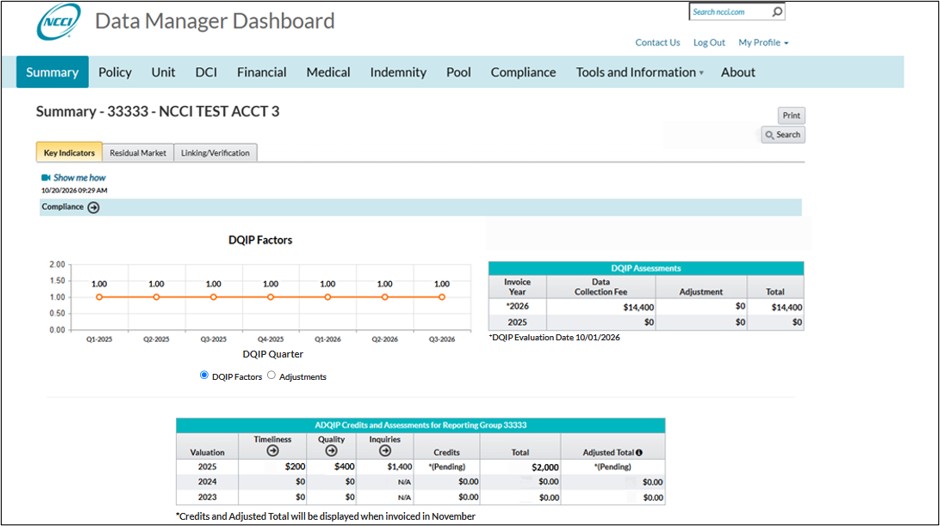
Financial Call data inquiry assessments will be included in the
ADQIP Credits and Assessments table on the Summary main page.
Note: Screen examples and displayed valuation years are for illustrative purposes only.
The
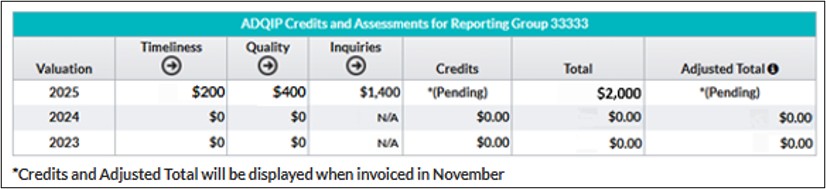
ADQIP Credits and Assessments table has been expanded to include an Inquiries column for the summarized assessment amounts by valuation year for the current and two prior valuations.
Note: Screen examples and displayed valuation years are for illustrative purposes only.
In addition, the table now includes the Adjusted Total column. Adjusted Total is the amount after any adjustments are applied per the Maximum Assessment rules as outlined in NCCI’s
Data Quality Guidebook. This is the amount that NCCI will assess or credit the carrier.
Financial Menu Page
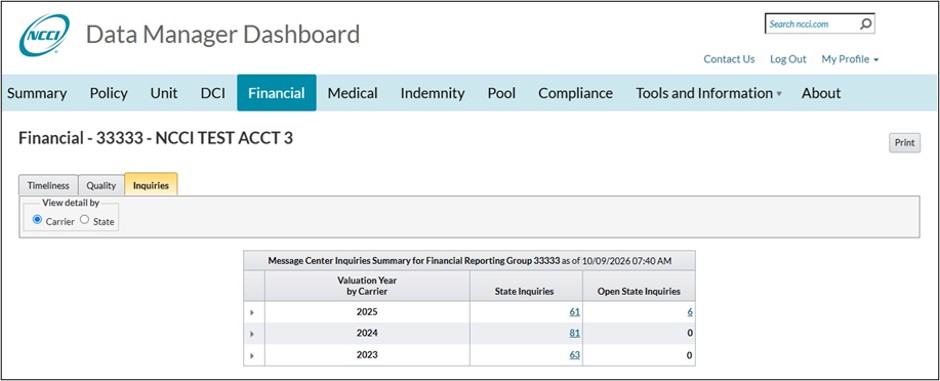
We have added a new Inquiries tab to the Financial section.
Note: Screen examples and displayed valuation years are for illustrative purposes only.
Updated in real time, this tab shows total state inquiries (open and closed) and open state counts of Financial Call data inquiries for the current and two prior valuation years. You can use the “View detail by” filter option to display counts by carrier or by state.
Note: A state inquiry is the count of inquiries at the state level. If a Message Center inquiry applies to multiple states, it is counted once for each applicable state.
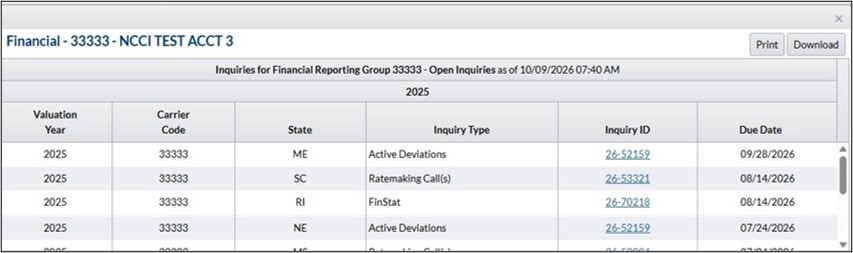
Clicking the hyperlinked numbers will open a detailed listing of the applicable inquiries. For example, accessing the list for Open State Inquiries allows you to identify actionable inquiries.
Note: Screen examples and displayed valuation years are for illustrative purposes only.
You can sort the list by clicking the column headers.
The Inquiry ID is a hyperlink, which takes you to the Message Center inquiry within the
Financial Data Collection tool, allowing you to quickly view and address questions related to your Financial Call data. This view also enables you to monitor inquiries and prioritize issues according to the displayed due date.
Aggregate Data Quality Incentive Program (ADQIP)
In addition, we have added the Financial Call data inquiries and any associated assessment amounts to the ADQIP section under the Compliance main page.
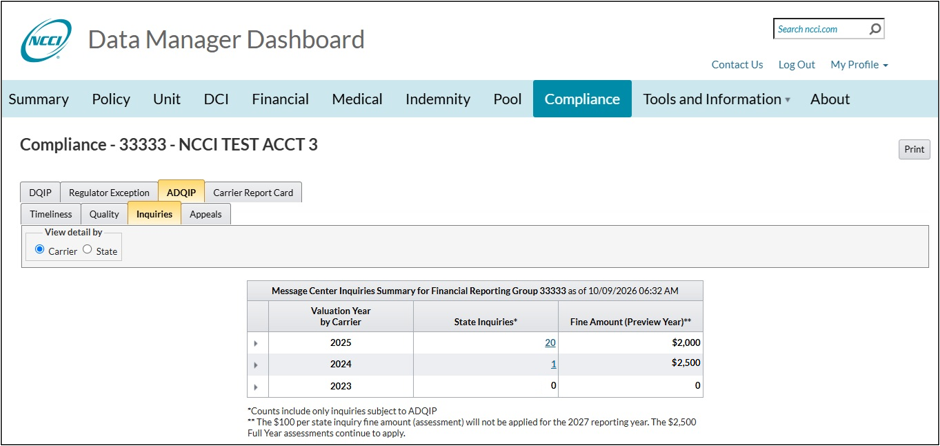
Note: Screen examples and displayed valuation years are for illustrative purposes only.
This tab shows state counts and associated assessment amounts for Financial Call data inquiries by valuation year. You can choose to “View detail by” carrier or state.
Note: A state inquiry is the count of inquiries at the state level. If a Message Center inquiry applies to multiple states, it is counted once for each applicable state.
Clicking the hyperlinked numbers will open a detailed listing of the applicable inquiries with their assessment amounts.
Note: The 2027 Financial Call season (@2026 Valuation) will be a preview period. During this period, all displayed assessment amounts will be for informational purposes only and will not be billed.
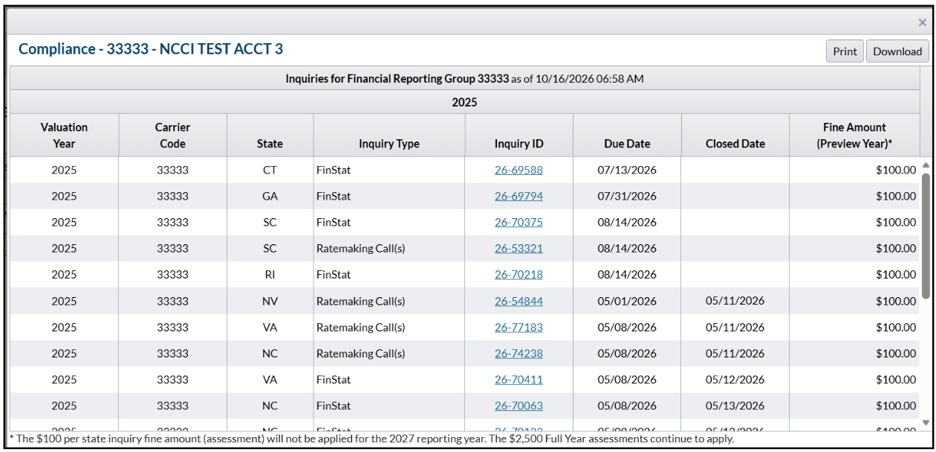
Note: Screen examples and displayed valuation years are for illustrative purposes only.
The Inquiry ID is a hyperlink, which takes you to the Message Center inquiry within the
Financial Data Collection tool, allowing you to quickly view and address questions related to your Financial Call data. This view also enables you to monitor inquiries and prioritize issues according to the displayed due date.
This screen allows you to track the impact of your past-due inquiries along with their associated
ADQIP assessments.
Counts for Policies Received by Effective Year

The
Data Manager Dashboard continues to expand its policy reporting capabilities with the addition of summarized counts for Policies Received by Effective Year for NCCI states and Indiana. This enhancement makes it easier to monitor policy reporting performance by showing which policies have been reported. You can compare this list with your source system to identify those policies that may still be missing. It enables you to quickly identify potential gaps in your reported policy data and more effectively track and improve the completeness of that data.
The new feature makes it easier to confirm that all required policies effective within a given year have been reported, eliminating the need to request information from NCCI.
Summarized Counts
This new screen provides a count of policies received by NCCI based on effective date for the current policy year and two prior policy years.

The data is organized by voluntary market and assigned risk market and grouped by effective year. You can view the counts by Effective Month, Carrier, or Carrier by Month, and expand each year to see monthly details.
To access the information in
DMD, navigate to the Policy Timeliness section and select the new Effective tab.
Policy Details
For further analysis, you can access the detailed Policy Data by clicking on the hyperlinks within the grid.

This action will open a pop-up window that shows a list of the policies applicable to the selected hyperlink.

The pop-up shows the policy details and the number of days received before or after the Policy Effective Date.
Improved Data Linking Views

Stay tuned for additional details in fourth quarter of 2026 as this
DMD enhancement progresses.